Trice vs other 3D viewers
An honest look at what makes Trice different.
An honest, side-by-side look at Trice and model-viewer, Google's open-source web component for adding interactive 3D models to a web page. See which one fits your project best.
Read comparison →An honest, side-by-side look at Trice and Sketchfab, the popular 3D model platform. See which one is right for you.
Read comparison →What makes Trice different
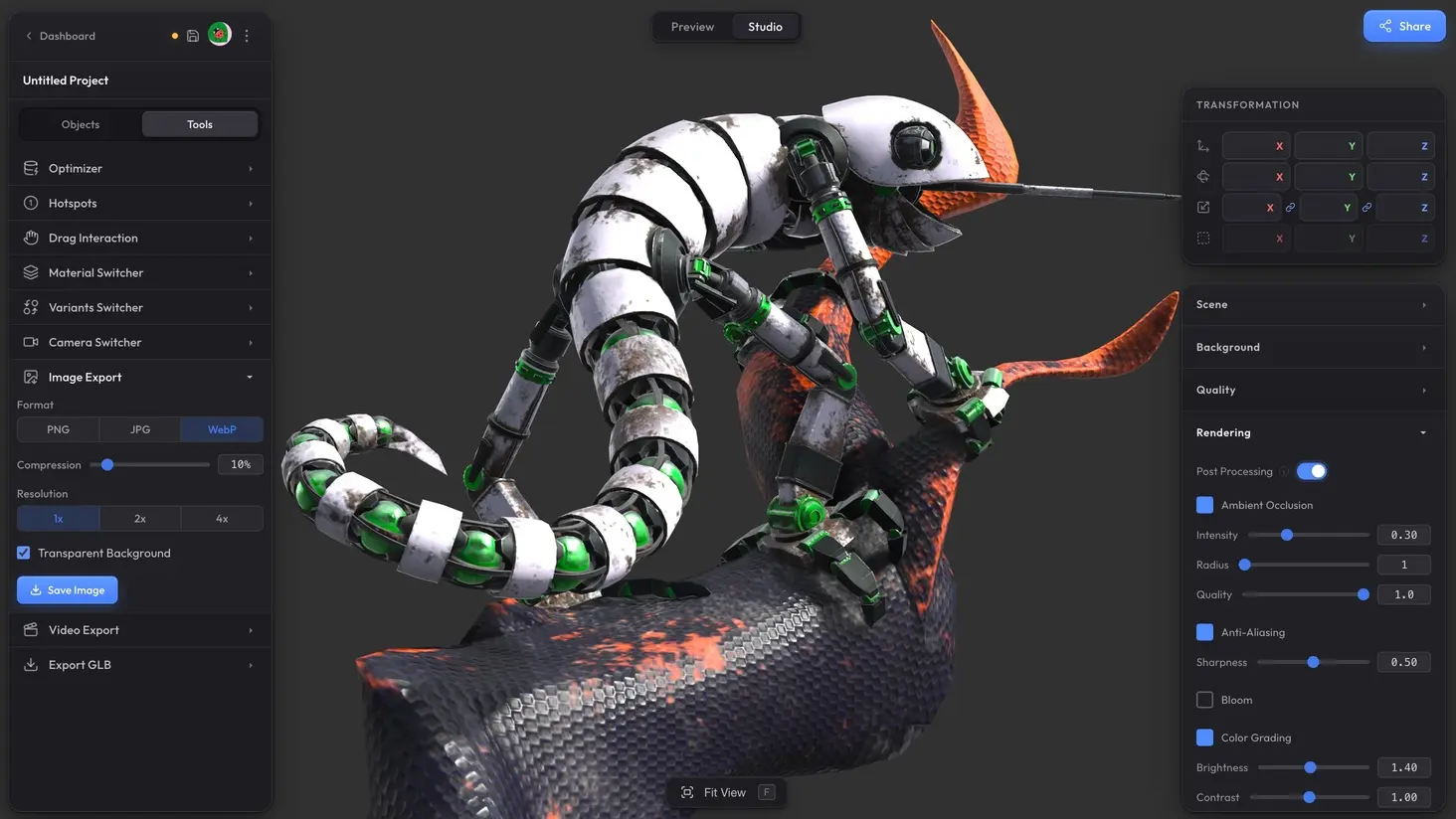
Your model looks great immediately
In most 3D viewers, an imported model looks flat, dull, or just off. Lighting is wrong, colors look washed out, something is overexposed or too dark. You end up spending a long time tweaking settings to get something presentable — and some viewers don't even give you those controls.
In Trice, your model looks great the moment you drop it in. The default lighting, tone mapping, exposure, and shading are carefully tuned so there's virtually no chance your model will look bad. Colors stay accurate, nothing is blown out, nothing is lost in shadow. Even a bare mesh without textures looks good — the environment and shading just work.
From there, you can make it look even better. Scene settings like lighting, shadows, and post-processing effects are designed to be simple and forgiving — you can't really make things worse, only better. Think of it as going from "looks great" to "wow" in a few minutes, not hours.
Heavy scenes stay smooth
Many viewers start struggling as you approach even a million polygons. Add dozens of textures on top of that and the framerate drops, the page lags, and on mobile it can crash entirely. If you try to embed more than one viewer on a page, the site often becomes unusable.
Trice handles scenes with 15 million+ polygons and dozens of textures at 60+ FPS. Our engine is built on WebGPU (with WebGL 2 fallback), giving us access to modern GPU capabilities that older viewers simply can't match. When the camera stops moving, the GPU goes to 0% utilization — it literally sleeps until something changes. This means you can embed dozens of 3D scenes on a single page and your site stays fast.
Optimization that makes a real difference
With most viewers, optimizing a model is your problem. You need external tools, manual compression, texture resizing — a whole pipeline before you can even upload. Some viewers don't compress at all, so your visitors download the full unoptimized file.
In Trice, every model is automatically compressed with meshopt on import — smaller files, same visual quality. On top of that, there's a powerful one-click optimization that can take things much further. We've seen models go from 150 MB down to under 10 MB with no visible quality loss.
Scenes load fast
Loading speed matters — especially for embeds on your website where visitors won't wait around. In most viewers, what you upload is what gets downloaded. If it's a 50 MB model, your visitors download 50 MB.
Trice tackles this from two angles. First, automatic optimization dramatically reduces file size, so there's simply less data to transfer. Second, we use progressive texture loading — the scene appears quickly with lower-resolution textures, then silently upgrades to full quality in the background. Your visitors see the model in seconds, not staring at a loading bar.
Not just a viewer — a full scene editor
Most 3D viewers do one thing: display a single model. That's it. You can orbit around it, maybe toggle wireframe, and that's the extent of it.
Trice is a full 3D studio in your browser. Load multiple models into one scene, position them with transform gizmos, edit materials right in the browser, set up multi-model compositions. Build a product showcase, an architectural walkthrough, or a design presentation — all in one place, then share or embed it with a single link.
Interactive features built in
Most viewers let you orbit a model and that's about it. Anything beyond basic viewing — guided tours, product configurators, camera sequences — is either a paid add-on, requires custom code, or simply doesn't exist.
In Trice, all of this is built in:
- Hotspots with guided tours
- Camera switcher with cinematic transitions
- Material variants — let viewers switch colors and finishes
- Object variants — swap between configurations
- Drag objects and rotate individual objects instead of the camera
- Video export and image export
Everything is set up through a visual editor, no code required. Your embeds become interactive experiences, not static model viewers.
Free, no watermark, self-hosted
Most 3D viewers either charge you for embedding or stamp a watermark on free-tier embeds. That's a dealbreaker for many businesses and freelancers who need clean, professional-looking 3D on their site without a monthly bill.
Trice offers unlimited self-hosted shares with no watermark on the free plan. You host the model files on your own server or CDN, and Trice handles the rendering. No storage limits on our side, no branding forced onto your site.
Your models actually import correctly
This is a frustrating one. You spend time preparing a model, upload it to a viewer, and... it's broken. Missing textures, flipped normals, wrong scale, broken animations, or it just refuses to load entirely. Many viewers have significant gaps in format support and silently fail on edge cases.
We've put serious effort into import reliability. Trice supports GLB, GLTF, FBX, OBJ, 3MF, STL, DAE, 3DM, PLY, and VOX — and we actively test against a wide range of real-world files, not just reference models. We're not perfect and there's always room to improve, but the percentage of models that import with issues in Trice is noticeably lower than in most alternatives.
If you notice an issue, let us know with Send feedback in the Studio menu or on our Discord server — we'll either fix it as soon as possible or explain what's causing it and whether it can be resolved.
An affordable Pro plan that unlocks everything
Some viewers gate basic features behind expensive plans or charge per-embed fees. With Trice, the free plan already covers the full viewer and core features — including hotspots with guided tours and video export — with no watermark on self-hosted shares.
When you're ready for more, Pro is $8/month (billed annually) and unlocks everything: unlimited projects, 50 GB of storage (which goes a very long way with our optimization), hosted shares with no watermark, hotspot styling with custom icons, material and object variants, video export up to 4K and 60 fps without a watermark, server-side optimization, and priority support. No hidden tiers, no per-embed pricing.
We build what you actually need
Big platforms tend to move slowly and add features nobody asked for. UIs get cluttered, settings get buried, and the tool becomes harder to use over time.
We're a small team and we like it that way. We listen to what our users need, we don't add features for the sake of adding features, we keep the UI clean and straightforward, and we fix bugs fast. If something is broken, it usually gets patched within days, not months.
Trice is built for people who need to get 3D on their website quickly, reliably, and with great visual quality — without fighting the tool along the way.
We're not perfect and we don't cover every use case — there are things other viewers do that we don't. But what Trice does, it does better, simpler, and faster than most alternatives. We're actively developing, we listen to what our users need, and we're always open to talk. Have a question or an idea? Reach out at hello@trice3d.com.
Questions
Yes. The free plan includes the full viewer, scene editor, multi-format import, client-side optimization, hotspots with guided tours, video export, and unlimited self-hosted shares with no watermark. Pro adds more storage, watermark-free hosted shares, and features like marker styling, variants, and unrestricted video export.
If you have your original model files (FBX, OBJ, GLB, etc.), just drag them into Trice. We handle conversion, compression, and optimization automatically. No manual re-export needed.
We ship fast. Let us know what you need — if it makes sense for the product, there's a good chance we'll build it.